Case study
Filtered Email Alerts to Microsoft Teams (Power Automate)
Client type: Operations-led organisation (Australia)
Case study
Client type: Operations-led organisation (Australia)
Teams relied on shared mailboxes and manual forwarding to stay informed. Important messages were easy to miss, and irrelevant email noise made it harder for groups to trust their channels. There was no consistent way to push only the right context into Microsoft Teams where people actually collaborate.
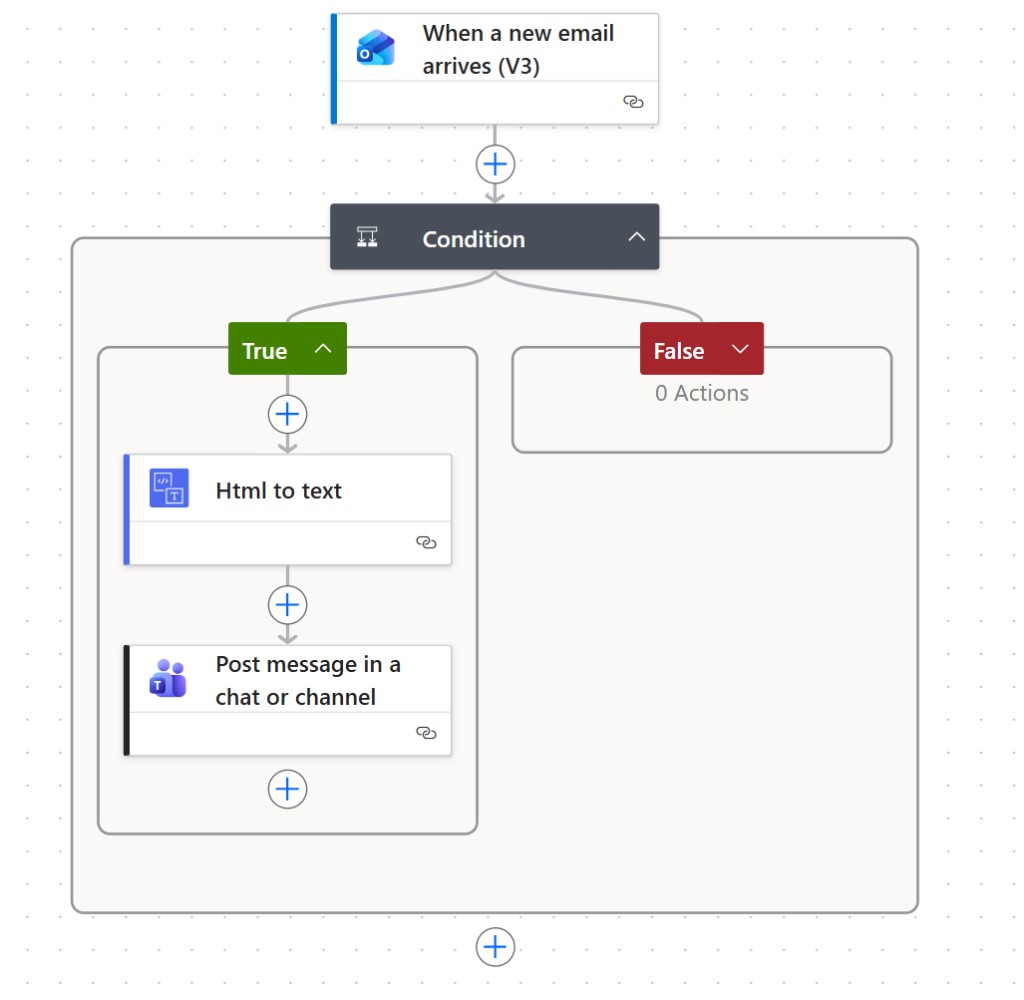
Cloudploys designed and implemented a Power Automate cloud flow using the Outlook “When a new email arrives (V3)” trigger.
A condition block applies the organisation’s filtering rules (sender, subject, keywords, or other criteria). When the condition is true, the flow converts the email body from HTML to plain text for clean reading in chat, then posts a structured message to the appropriate Teams channel or chat so the right group sees relevant details immediately. When the condition is false, no Teams noise is generated.
Screenshot of the production flow: trigger on new mail, filter with a condition, convert body to text, and notify Teams — with no action when criteria are not met.
Faster awareness of emails that matter to each team
Less channel clutter from non-actionable mail
Repeatable M365 automation maintainable in Power Automate
Tell us about your systems and constraints — we work with teams across Australia.
Start a conversation